I just happened to perform a great traffic trick yesterday; and totally by accident. It involves SlideShare and LinkedIn. I’m a big fan of LinkedIn, it is like Facebook for business people but I had never used SlideShare until yesterday (I had the account, but never actually did anything with it).
Earlier this week I was watching some nice PowerPoint presentations and quite a few were hosted at SlideShare.net. That got my attention so I decided to do some research and found out that SlideShare was huge!
SlideShare is the world’s largest community for sharing all kinds of presentations, not just PowerPoints. It gets over 50 million monthly visitors and is one of the most visited 250 websites in the world. SlideShare content spreads virally through blogs and social networks such as LinkedIn, Facebook and Twitter. Spreads virally, eh? That mention got my interest! I decided it was time to make my first SlideShare thingy. Here it is, but don’t start watching it now. Read on, ok?
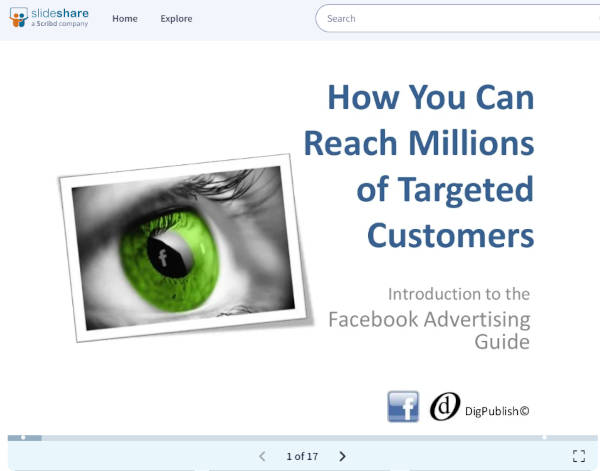
Ok, once I created this 15-slide master piece of mine it was time to upload it to SlideShare. I logged in to my dormant account and uploaded the beast. Once there I added some keywords and descriptions to the file and thought, cool. -But whos’ going to see this?
Then I saw some familiar looking social sharing buttons next to my presentation and clicked a few. When I clicked on the LinkedIn share -button a pop-up window opened up with some choices. There are several options how you can share stuff on LinkedIn. You can share normally on your own wall or you can post to LinkedIn Groups. Hmm, I wonder what would happen if I posted this thing to all the groups I belong to? So I did, and went on my well earned lunch break.
During lunch something had happened. I received an email from SlideShare. Bang!
“Facebook Advertising Guide” is being talked about on LinkedIn more than anything else on SlideShare right now. So we’ve put it on the homepage of SlideShare.net (in the “Hot on LinkedIn” section).
Well done!
– SlideShare Team
My presentation was being featured right on the SlideShare homepage! At the bottom of it, and below the fold, but still I was happy as a clam about this unexpected fame. Excited about this I did a few more Tweets and a few Facebook posts and I was trying to email all my contacts about this but SlideShare couldn’t import my Gmail account for some reason, so I left it at that and went on doing some other important stuff for the day.
Six hours later I received another email from SlideShare. Double Bang!
Your presentation Facebook Advertising Guide is currently being featured on the SlideShare homepage by our editorial team. We thank you for this terrific presentation, that has been chosen from amongst the thousands that are uploaded to SlideShare everyday.
P.S – Why not blog/twitter this and let the world know about this awesome masterpiece you have created? We have tweeted about this here.
Wow! I was now being featured on their ‘Featured’ -section at the top part of the screen. There it is on the first row on the right hand side:
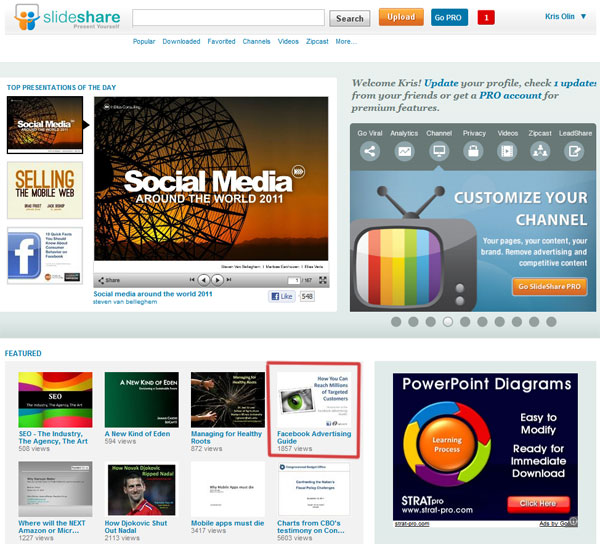
As you can see my little presentation had gained 1.857 views so far. And this is just in a few hours from producing it and uploading it! Is that crazy or what?!
Ok, time to calm down now and do some semi-scientific analysis of what just happened.
In my view the reason I received this awesome treatment on SlideShare must lie in LinkedIn. When I posted on the LinkedIn Groups (about 15 of them) that action was recorded by SlideShare and gave me the position on their homepage in the ‘Hot On LinkedIn‘ -section; so that sort of broke the ice.
Once it hit the SlideShare home page the presentation was gaining rapidly some additional exposure and this elevated it into the ‘Featured‘ -category. I don’t think I would have received similar results if I hadn’t posted it on the LinkedIn Groups.
How To Use LinkedIn and SlideShare To Get Some Crazy Traffic To Your Website
So, the recipe to get some good traffic is this:
1. Make a short presentation of the thing that you do
2. Upload it to SlideShare
3. Use the built in sharing functions that SlideShare offers. For me the trick was sharing it with my LinkedIn Groups, but for you you it could be Facebook or Twitter.
4. Repeat with your next presentation
Ok, that’s it. Thanks for reading so far! It would be cool if you could click on some of the social sharing buttons on this post to help me spread the word.
Next week we’re going to talk more about LinkedIn as I’m presenting a guest post from Mr. LinkedIn Marketing himself, Lewis Howes. It should be great!
Let me know if you have been using SlideShare and or LinkedIn in your marketing and what kind of results have you been getting. If you haven’t used SlideShare yet, maybe it’s time to do so.


September 15, 2011 at 7:51 pm
Hey Kris
Great share of information!
You can also upload PDFs to SLideshare too….I uploaded a couple around a month ago. So far not had a great deal of success – around 200 views and a few downloads. Must publicize those a bit more – and must think about LinkedIn too and getting onto the platform if you’re getting great results like this!
Rock on. Look forward to Lewis’s post.
Paul
October 14, 2011 at 1:39 am
That’s a helpful tip Paul – most of us find it quickest to upload PDFs.
October 14, 2011 at 2:08 pm
Yes, PDF’s are on my to-do list as well, mate!
September 16, 2011 at 9:49 am
Thanks, Paul!
Yes, I agree that no social sharing platform by itself creates you traffic just like that. The key lies in the promotion you do for your material after it has been uploaded. In this case it was the LI groups, which was quite surprising. I have to try some PDF’s next time. You can do pretty serious interactive stuff with Acrobat!
Keep on rockin’ mate!
September 17, 2011 at 12:12 am
Kris,
Followed your comment on my blog post about “is LinkedIn worth the effort?” From SocialMediaToday
http://socialmediatoday.com/john-wilkerson/357462/linkedin-worth-effort#comments
Your article was a good read and focused on the key aspects of implementation.
Thanks for the feedback.
I RSS’d your site.
John
September 19, 2011 at 9:12 am
Hi John, and thanks for the RSS!
September 20, 2011 at 5:55 pm
Hey Kris! That’s an awesome case study! But still I think there’s some luck involved, just like in any other viral campaign
You can be sure I’ll try to replicate this soon, but I’m not hoping to get the results you did as I truly believe this need some luck involved
September 20, 2011 at 8:56 pm
You are right, Tim. You can’t really plan your message to go viral and it’ll just happen like that. I will see if I can repeat the result with my next presentation; then we’ll know. As anticipated, my visit to the SlideShare Featured -section was short lived and my clicks have now settled a bit over 2.900.
September 21, 2011 at 11:57 pm
This looks like a great tool, Kris! I also think I have a dormant Slideshare account.
I’m going to get involved in some groups on LinkedIn, spend some time getting engaged with folks and see what people are talking about. Maybe when I have something presentable I’ll give this a shot. Very cool, man.
September 22, 2011 at 9:37 am
@John Garrett It’s definitely worth a try, or two, man! You see some awesome presentations there and they’re not that hard to do yourself if you have some PowerPoint experience.
The main thing I noticed was that since the default presentations size is not that big on SlideShare you need to make your text quite large; larger that you would if you were presenting in a normal live audience situation.
SlideShare account is also one more important piece of your own social media landscape as they will give you a custom URL.
October 12, 2011 at 6:27 am
Great Article Kris! I have wrote down Slideshare as a traffic technique but haven’t put it into action. I will now though 8)
October 12, 2011 at 9:32 am
Thanks Joshua,
Let me know how you go with it. If you do the LinkedIn trick, join at least 15 groups and follow up any comments that might happen there. Even start a few yourself to get the ball rolling. Post the link to your presentation here so we can all have a look, mate.
October 12, 2011 at 1:15 pm
I have used Slideshare in the past and I have found it to be very helpful. It is a great way to re-purpose your original content. However I have never thought about the viral marketing part. That is a huge plus.
October 12, 2011 at 1:23 pm
Yes, I agree Sammy. Slideshare has gotten so big now that it sure can help you with your viral marketing goals.
Have you tried to convert them into video? I’d love to do that so I could go to YouTube with the same material; maybe just add a sound track or some music.
October 12, 2011 at 7:12 pm
Great job I bet that made your day lol. You can also upload free ebooks to slideshare too they get a lot of views another trick you may want to add to your arsenal.
October 13, 2011 at 9:34 am
Thanks for the tip, Jay!
I must give it a go with that. I have a free sample chapter for my book available as e-book, so I might go and upload that. You can get one here for a tweet if you like: http://bit.ly/fbagscPWT
October 13, 2011 at 3:58 am
Nice! Congratulations
ps. Kim Roach is now spreading the word about you and your presentation!
Wayne Wymore
Who will definitely get one of these up soon too…
October 13, 2011 at 9:27 am
Thanks Wayne,
When you get your presentation there, shoot us your link here, so we can go and have a peek.
PS. good on Kim Roach @Buzzblogger!
October 13, 2011 at 6:29 am
Hi Kim
i didn’t used slide share before and this the first time i heared about so i’ll give it a try in the next days
and i want to get some success of yours specially with linkedin groups.
i want to tell you that is a fantastic result of your post that can boost your traffic to a higher level.
Essam Kassab
http://www.homes-business.com
October 13, 2011 at 9:19 am
Thanks for you comment Essam!
When you upload your presentation to SlideShare remember to configure it with some quality keywords, so that it can come up in searches as well. And don’t forget to post you link here so we can all have a look.
October 13, 2011 at 8:45 am
Congratulations on your discovery and success. Can you say mire about your 15 LinkedIn groups? Did you start or just join them and how much time do you spend on them?
October 13, 2011 at 9:09 am
Hey R, and thanks!
I’ve been using LinkedIn actively for about 2 years and gradually joined about 40 groups by now. However, if you wanted to join 15 or 20 groups all at once you can do that too.
All you need to do is do a search for your area of interest in the groups section (top right). When you find a group that you’d like to join, just go to the group and click on the Join Group -button. Some groups will approve your application immediately and some go through their admin.
I have actually been quite lazy with my groups until now. Mostly just posting links whenever I have published a new blog post or found something interesting on the web.
October 13, 2011 at 6:58 pm
Wow, thanks Kris! I too have slideshare but never used it!
Will definitely be trying this out, thanks
Heard about this through Kim Roach
Sue Collier
October 13, 2011 at 7:18 pm
Thanks for your comment, Sue!
SlideShare seems to be a serious tool for getting your message go viral. I just read on Kim’s blog this afternoon that someone did the trick and got over 4.500 views in 21 hours! I guess this works!
Post your presentation URL here when you have it live, so we can all go dig it and share it!
October 13, 2011 at 8:59 pm
Thanks for the tips! Slideshare is awesome…I just started using it but am already starting to get some traffic. Thanks for sharing this and for emphasizing the fact that to make it work you have to promote it through the other social networks for maximum impact.
October 14, 2011 at 2:01 pm
Thanks for the comment bolder!
If you like you can post your Slideshare link here and we’ll go and digg it! Sharing is what it’s all about.
October 13, 2011 at 10:55 pm
Wow man, that’s brilliant!
Admittedly your slide is pretty awesome as well (helps) but the overall lesson here and the value you have shared cannot be ignored!
Came over from Kim Roach’s post and sure glad I did mate.
Thanks for sharing, and it was nice to meet you Kris
October 14, 2011 at 1:59 pm
Thanks Alex! Good to meet you too, mate!
October 15, 2011 at 2:59 am
Really good article Kris. Slideshare is another awesome way to communicate with your audience. I have used Slideshare but must admit that I haven’t updated it recently. So you have certainly inspired me to do just that. You can also share your YouTube videos and even documents on Slideshare. It really is a wonderful feature of Linkedin that is truly a benefit as you point out here. Thank you for sharing your presentations, they are awesome!
October 17, 2011 at 11:09 am
Thank you for you kind comment, Lynn!
I must try to upload a video sometime in the future as well. Isn’t it crazy that videos can actually now be called “YouTube Videos”, even though the are just your normal video files that can be uploaded and presented in lots of different places, not just YouTube? It’s getting to be like “Xeroxing”.
I checked out your blog and found out that there’s lots of good info on LinkedIn as well; like this one: http://learnit2earnitwithlynn.com/linkedin-tips/tips-for-creating-a-successful-group
Nice!
October 17, 2011 at 3:48 pm
Yes I know what you mean Kris about the ‘Xeroxing’, wow, are we showing our age?! It is amazing how things are changing and seems like they are changing so quickly. I do enjoy uploading my videos to YouTube but now have found Vimeo as well. Plus the social sites like Tumblr, Posterous, Stumbleupon, as I am sure you already know.
Thank you for taking time to visit my blog and glad to see you enjoyed the Linkedin post. Linkedin is my favorite platform as it has produced the most results for me and my business. How about you?
October 17, 2011 at 3:54 pm
I have to confess that I have not yet used LinkedIn to its full potential. This crazy experiment I did with SlideShare was about the closest I can think of. Mostly what I do is just post a link to some groups that I belong to when I publish a new blog post. I really should get more into it in the future.
October 21, 2011 at 6:54 am
Great resuts .. you go girl. I have Slideshare account need to get some content out on there x
Thanks for the tip
October 21, 2011 at 10:16 pm
I have heard about the opportunity using Slideshare. Its always great when someone can share their work and informational insights to help others is always great! Thank you for another great traffic getting tips!
October 22, 2011 at 4:35 am
Wow – very cool. Going to have to give this a try!
October 22, 2011 at 10:21 pm
Sorry, but I don’t get it. Oh, I get the concept all right, but why would anyone want to view PowerPoint slides without movement, music or voice over? Seems pretty boring.
October 25, 2011 at 12:43 pm
At first you might think that it would be boring, wouldn’t you? However, there is some magic in just having words and images on paper (or computer screen in this case). Slideshare is in the top 250 websites in the world with over 200K clicks a day, so at least some people enjoy the “good old” slide shows.
October 23, 2011 at 8:53 am
Great stuff here, very useful for traffic.
Dwight Anthony
Financially Elite Blog dot Com
October 28, 2011 at 8:56 am
I am a LinkedIn user, but I had no idea its power. Thank you for your diligent research. I will relook at LinkedIn and see what I can do to utilize SlideShare with it.
October 28, 2011 at 11:02 am
Thanks for your comment, Laura!
Yes, you can use LinkedIn to many things marketing. I think it is wonderful in connecting professional people (just like Facebook, but for pro’s). Also the LI Groups are great for connections as well as marketing purposes.The best way to get you started is to create a short PowerPoint presentation of your organics business and upload it to SlideShare.
November 13, 2011 at 4:21 am
looks like a great strategy
November 13, 2011 at 9:59 am
Thanks Adam,
It sure does seem to work quite nicely if you put some effort in it.
December 15, 2011 at 7:41 pm
Ok this looks super cool but i think it may not be the rule. You cannot spam linkedin with low quality content. This goes to all potential spammers out there. Good work Kris and thanks for sharing
December 16, 2011 at 2:53 am
Cool info on using slideshare. A marketing tool I can definitely use more.
January 19, 2012 at 5:51 am
Thanks great info. I will try it as well.
January 19, 2012 at 2:33 pm
No worries! Let me know how it goes, Andy.