When our small publishing site decided to try Pinterest in October 2026, we started from a genuinely empty account. No followers, no boards, no pins — and, honestly, no certainty that a site about SEO tools and software comparisons even belonged on a platform most people associate with recipes and home decor.
This is not a success story, because it is far too early for one. It is the playbook we followed in month one: the decisions we made before posting anything, the system we built so a two-person team could keep it running, and the rules we set for judging whether it deserves to survive. If you run a small site and have been putting Pinterest off because it feels like one more channel to feed, this is the order I would do it in.
Step 1: Set Your Account Up Like a Search Engine, Not Social Profile
The first mindset shift is that Pinterest is closer to Google than to Facebook. People open it with a question already in mind, and pins keep being found in search months later. That changes how you set things up.
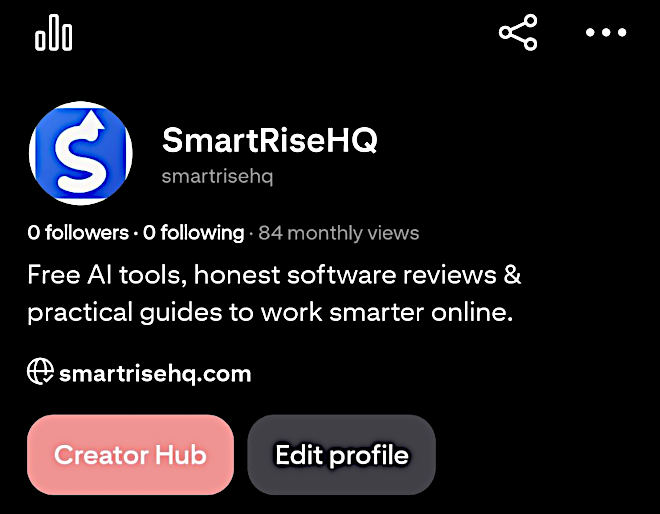
We created a free business account rather than a personal one, for two practical reasons: analytics, and the ability to claim our website. Claiming smartrisehq.com involved placing a small verification tag on the site — a ten-minute job through our site’s code-snippet tool, no theme files touched — and it matters because every pin from a claimed site carries the site’s name and link properly.
The profile itself took less thought than we expected. Name, logo, and a short bio written in the words a searcher would use: free tools, honest comparisons and practical marketing guides. No clever tagline. On Pinterest, being found matters more than sounding smart.
Step 2: Name Your Boards After Searches, Not After Your Brand
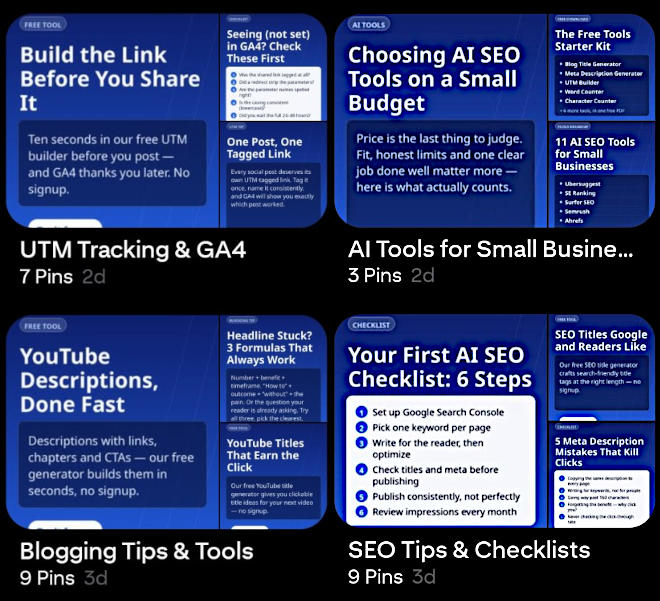
Boards are Pinterest’s version of categories, and we treated their names as keywords, because that is effectively what they are. Instead of one board called “SmartRiseHQ Articles”, we created boards named the way people actually search:
- SEO Tips & Checklists
- Blogging Tips & Tools
- AI Tools for Small Business
- UTM Tracking & GA4
Each board got a plain-language description using the same search phrases, and we made a rule on day one: every pin belongs to exactly one board — the one it fits best. Dumping the same pin everywhere looks like spam because, frankly, it is spam.
One deliberate omission: we did not make boards for our comparison articles. Someone searching Pinterest for blogging checklists is plausible; someone searching it for a head-to-head verdict between two SEO suites is not. Those pages are a Google play, and forcing them onto Pinterest would have wasted our first month producing pins nobody was looking for.
Step 3: Build The First Batch Before You Post Anything
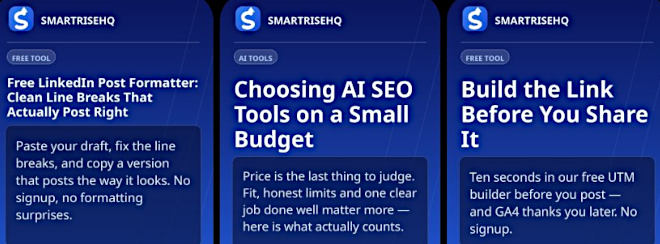
The decision that saved this project was refusing to design pins one at a time. Instead, we built three reusable templates first — a single-tip card, a checklist pin, and a list/roundup pin — all in the standard tall 1000×1500 format and all carrying the same branding, so anything we produce is recognisable in a feed.
From those templates we produced a first batch of 14 pins in one sitting, each one taken from content that already existed on the site: a meta description guide became “How to Write a Meta Description in 6 Steps”; a UTM guide became “5 Habits That Keep GA4 Data Clean”; our free tools became simple, useful pins of their own. No new articles were written for Pinterest. The channel had to earn its keep from inventory we already had.
Every pin title and description was written by hand, in the words of the search it should answer, and every pin links to the exact page it illustrates — never to the homepage. And a rule we wrote down early: when a page gets pinned again later, it gets a new image. Pinterest rewards fresh pins and quietly buries identical re-uploads.
Step 4: Two Pins a Day Through Pinterest’s Own Scheduler
Our posting rhythm is unglamorous: two pins a day, scheduled in advance through Pinterest’s own built-in scheduler. No third-party posting tools, no automation scripts. That is partly a safety choice — accounts get flagged for bot-like behaviour, and a flagged account ends the experiment — and partly a workload one. A batch of 14 pins covers a week, so the whole channel costs us roughly one production session a week.
Consistency also beats intensity here. Fourteen pins in one afternoon and then silence for a fortnight looks exactly like what it is. Two a day looks like a publisher.
Step 5: Decide in Advance How You Will Judge It
This is the step most small teams skip, and it is the one that keeps a slow channel from becoming a permanent guilt item. Before our first pin went out, we agreed on the expectations and the exit:
- Weeks 1–4: expect almost nothing. Measuring outbound clicks in the first month only manufactures disappointment.
- Weeks 4–6: look for the first saves and clicks in Pinterest Analytics, and check referral traffic in GA4 alongside it.
- Day 90: the real verdict. If, after 150 or more pins, outbound clicks are still effectively zero, we stop, and the templates and batches have cost us nothing further. If clicks are growing month over month, the channel stays and earns a slightly bigger batch.
Writing the kill rule down in advance is not pessimism. It is what makes it safe to try a channel whose payoff, if it comes, arrives slowly and then keeps arriving — a pin published in month one can still be sending readers in month six, which is something no Facebook post we have ever made can claim.
What I Would Tell Another Small Publisher
Start smaller than your ambition. Claim your site, name four or five boards after real searches, build templates before pins, and let existing content do the work. Use the platform’s own scheduler, post like a publisher rather than a promoter, and set your judgement date before you start — then keep it.
Pinterest will not rescue a site that has nothing worth pinning. But if you already publish checklists, guides and tools that people search for, it may be the cheapest second engine you ever build. We will know by day 90 — and either way, we will know, because we decided in advance what “working” means.
[Recommended reading: How To Use Pinterest For eCommerce – Step By Step Guide]
[Image credits – Main Image by Karlo Curis from Pixabay]

Muhammad Aqeel is the editor of SmartRiseHQ, a small publication offering free SEO and writing tools, honest software comparisons and practical marketing guides for small teams. SmartRiseHQ recently started documenting its own Pinterest experiment, which began in October 2026.